

ServiceNow Vulnerability Response: Everything You Need to Know.
Along with technological advancements, cyber attackers are also evolving. They can seamlessly exploit vulnerable areas of your network within minutes. So, organizations must implement a full-stack security framework around their network and applications to remain on top of critical cyber risks that stay unpatched, compliance gaps, and potential data disasters.
As ServiceNow consultants, we see this problem daily across our clients’ environments. The solution isn’t only deploying more scanning tools; it’s adopting a smarter, automated vulnerability management solution, ServiceNow Vulnerability Response.
With best practices in ServiceNow consulting and implementation services, today, we would like to help you learn more about how ServiceNow’s threat intelligence capabilities provide visibility into your IT assets and possible risks and manage your organization’s security posture.
What Is ServiceNow Vulnerability Response?
ServiceNow Vulnerability Response (VR) is a Security Operations application that helps organizations manage, prioritize, and remediate vulnerabilities across their IT environment. It brings vulnerability data from external scanning tools into ServiceNow, connects findings with asset and business context from the CMDB, and coordinates remediation through assigned tasks, workflows, and tracking.
Rather than managing vulnerabilities in disconnected scanner dashboards or spreadsheets, security and IT teams can use ServiceNow Vulnerability Response to prioritize risks, assign remediation responsibilities, monitor progress, and maintain visibility into unresolved vulnerabilities.
ServiceNow Vulnerability Response helps organizations move from vulnerability detection to risk-informed remediation by connecting security findings with IT operational workflows.
ServiceNow Vulnerability Response Module: Key Capabilities
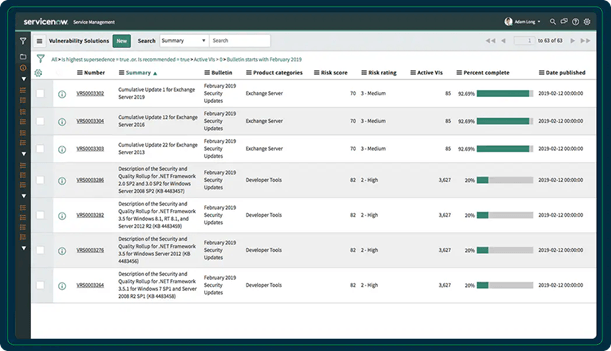
ServiceNow Vulnerability Response is a significant application within ServiceNow SecOps, a robust module that streamlines and automates incident and vulnerability management, providing transparency between security teams who find vulnerabilities and IT teams who fix them. It also works closely with several core ServiceNow modules, such as Governance, Risk, and Compliance (GRC) and IT Service Management (ITSM), to deliver value.
Capabilities and Benefits of ServiceNow Vulnerability Response
Here’s are key features and benefits of ServiceNow’s VR apart:
- ServiceNow VR and Service Graph Connector applications help organizations import risks from scanners, such as Tenable, Qualys, and Rapid7
- By supporting integration with the ITSM platform, ServiceNow VR ensures seamless remediation flows into change, incident, and problem management processes.
- Maps vulnerabilities to the CMDB, increasing visibility into which services and assets are at risk. This ensures centralized vulnerability management and a consolidated view of security risks within the ServiceNow platform.
- Prioritizes security risks based on their impact on business and IT operations, not just on CVSS scores.
- By automating workflows, ServiceNow VR routes remediation tasks into IT’s queue, reducing time to resolve security and compliance issues.
- ServiceNow’s VR provide audit-ready dashboards for real-time compliance and executive reporting.
Thus, instead of endless lists of vulnerabilities, ServiceNow threat intelligence reports provide clear, prioritized, and actionable remediation steps, all within the ServiceNow platform.
Recommended Read: Why Enterprises Should Choose ServiceNow SecOps
ServiceNow Vulnerability Response Integrations: Scanners, CMDB and Security Tools
ServiceNow Vulnerability Response connects vulnerability scanning tools, asset data, and remediation workflows to give security and IT teams a more coordinated view of vulnerability exposure.
Vulnerability Scanner Integrations
ServiceNow Vulnerability Response can ingest vulnerability findings from supported security scanners, helping organizations consolidate findings from different tools and coordinate remediation within ServiceNow.
Common integration options include:
- Tenable
- Qualys
- Rapid7
- Microsoft security solutions
- Other supported vulnerability data sources
The availability and functionality of integrations depend on the specific connector, application, version, and configuration.
CMDB Integration
The Configuration Management Database (CMDB) provides context about the assets affected by vulnerabilities. When vulnerability findings are associated with configuration items, teams can understand asset ownership, business criticality, service relationships, and the operational impact of remediation.
ITSM and Remediation Workflow Integration
ServiceNow Vulnerability Response connects security findings with IT operational processes, enabling teams to coordinate remediation through task assignment, change processes, ownership, tracking, and escalation.
Why These Integrations Matter
Integrating vulnerability scanners, CMDB data, and ITSM workflows helps organizations reduce manual coordination, improve vulnerability visibility, identify ownership, and prioritize remediation according to risk and business impact.
How does ServiceNow Vulnerability Response Work?
Vulnerability Response works by acting as a bridge between vulnerability scanners, IT operations, and business context. Instead of just listing vulnerabilities, this advanced application prioritizes and automates risk remediation in a structured workflow. Here’s a step-by-step overview of ServiceNow Vulnerability Response process:
Vulnerability Data Ingestion
- Initially, ServiceNow VR integrates with external scanners like Qualys, Tenable, Rapid7, or cloud security tools.
- Vulnerability data is imported into ServiceNow.
- Assets from scanners are matched with ServiceNow’s CMDB for context to check which applications, services, or business units they support.
Normalization & Deduplication
- Now, VR normalizes vulnerabilities across different scanners.
- Identifies and normalizes duplicates.
- Ensures accuracy of vulnerabilities.
Risk-Based Prioritization
- Vulnerabilities are enriched with threat intelligence feeds.
- Business impact is factored in from the CMDB and prioritized.
- Now, VR calculates a risk score so teams can focus on the high-priority vulnerabilities.
Workflow & Task Automation
- VR automatically creates remediation tasks in ServiceNow and assigns them to the respective IT operations or application owner.
- Integrates with ITSM’s Change Management if remediation requires patching or downtime.
- Supports SLAs and escalations to keep teams accountable.
Remediation & Tracking
- IT teams apply patching, configuration changes, or mitigations as needed.
- Updates are tracked in real-time in the VR application.
Validation & Closure
- After remediation, vulnerabilities can be re-scanned by the scanner.
- Now, VR validates the fix and closes the task automatically if the vulnerability is no longer detected.
- Full audit trails are maintained for compliance and reporting.
Reporting & Dashboards
- VR provides customized dashboards for executives, security teams, and IT teams to manage and deal with vulnerabilities at different stages.
- Tracks metrics like Mean Time to Remediate (MTTR) and compliance readiness, helping organizations measure the effectiveness of vulnerability management.
Vulnerability Management Challenges ServiceNow VR Helps Address
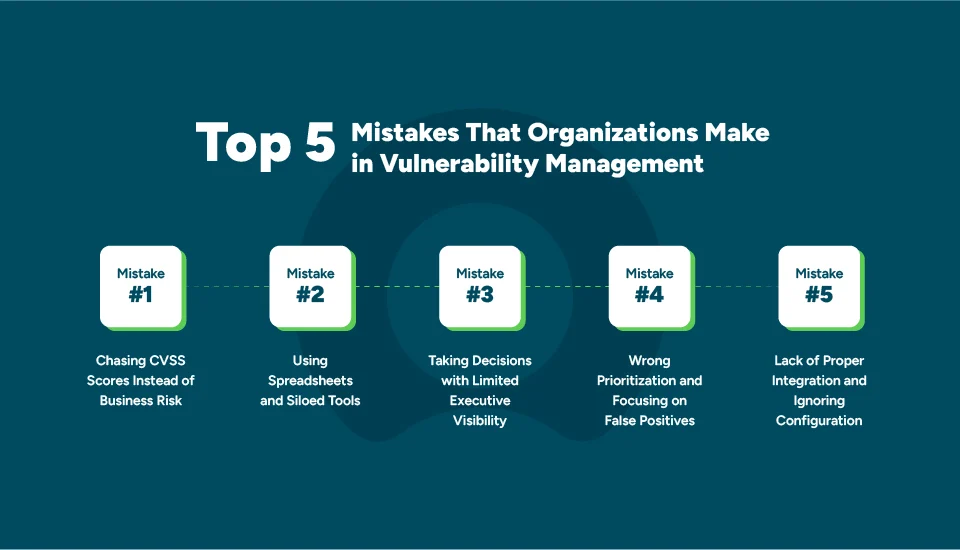
Many vulnerability management programs struggle not because they lack scanner data, but because findings are difficult to prioritize, assign, coordinate, and close. ServiceNow Vulnerability Response can help address several common operational challenges.
- Prioritizing CVSS scores without business context: Severity scores alone may not reflect the importance of an affected service or asset. CMDB and available threat context can help teams prioritize remediation based on business risk.
- Managing findings across spreadsheets and siloed tools: Disconnected data can slow assignment and follow-up. Consolidating supported scanner findings and coordinating remediation in ServiceNow helps establish a shared workflow.
- Limited visibility into remediation status: Dashboards and reports can help security leaders and operational teams see what is open, overdue, progressing, or requiring escalation.
- Duplicate findings and competing priorities: Normalization and deduplication, along with risk-based prioritization, can help reduce noise and focus attention on meaningful remediation work.
- Unclear ownership and disconnected IT processes: Integrating findings with asset context, task ownership, and ITSM processes helps security and IT teams coordinate remediation responsibilities.
Use Cases of ServiceNow Vulnerability Response Application
1. Centralized Vulnerability Management
ServiceNow VR consolidates vulnerabilities from multiple scanners into a single system, providing security teams complete visibility into risks and avoiding the chaos of managing findings in separate tools.
2. Risk-Based Prioritization
The ServiceNow Vulnerability Response application prioritizes security issues using CVSS scores, threat intelligence, and business impact, ensuring that teams focus on the most critical risks.
3. Automated Remediation Workflows
Vulnerability response automatically creates remediation tasks and assigns them to the right IT teams. It integrates with ITSM’s change and incident management, ensuring that fixes and progress are tracked to closure.
4. Integration with CMDB
By linking vulnerabilities to Configuration Items (CIs) in the CMDB, teams can see exactly which systems and services are impacted. This context helps prioritize vulnerabilities that affect business-critical assets.
5. SLA & Compliance Tracking
Organizations can define SLAs for remediation, such as fixing critical vulnerabilities within 7 days. ServiceNow VR tracks compliance against these SLAs and provides audit-ready reports for regulatory frameworks.
6. Threat Intelligence Integration
ServiceNow VR enriches vulnerability data with threat intelligence feeds. This allows teams to identify which vulnerabilities are actively being exploited and reduce noise by filtering out less relevant issues.
7. Reporting & Dashboards
Real-time dashboards give CISOs, security managers, and IT teams visibility into vulnerability trends, status, and SLA performance. Leadership and executives also get clear reporting on overall risk posture.
8. Incident Correlation
ServiceNow vulnerability response integrates with SIR to correlate vulnerabilities with actual security incidents. It helps teams determine if unpatched vulnerabilities are being exploited in active threats.
9. Cloud & Container Vulnerabilities
Modern environments like AWS, Azure, and GCP cloud are covered too. ServiceNow VR ingests vulnerabilities from cloud-native and container scanners to give a complete security view.
10. End-to-End Remediation Orchestration
Through integrations with tools like Intune or Tanium, VR can automate patch deployments. It verifies remediation and closes out vulnerability records, reducing manual effort and speeding up response.
Recommended Read: Benefits of ServiceNow SecOps
Best Practices to Utilize ServiceNow Vulnerability Response Application
1. Integrate All Vulnerability Data Sources
Bring all data from scanners, cloud platforms, and containers to get a single source of truth for vulnerabilities.
The Result: It eliminates siloed data, gives a single platform to view all possible issues, and ensures nothing is overlooked.
2. Leverage CMDB for Business Context
Link vulnerabilities to CIs, so you can prioritize issues that impact critical business operations.
The Result: It helps prioritize vulnerabilities based on the business criticality of assets, reducing risk to high-value services first.
3. Focus on Risk-Based Prioritization
Go beyond severity scores, use exploit data, business impact, and threat intelligence to address the vulnerabilities that matter most.
The Result: This avoids wasted effort on low-impact issues and ensures teams tackle the vulnerabilities most likely to be exploited.
4. Automate Remediation Workflows
Assign remediation tasks automatically to the right IT teams and connect with Change Management for seamless patching.
The Result: It speeds up response times, reduces manual errors, and ensures accountability by routing tasks directly to the right teams.
5. Define Clear SLAs and Monitor Compliance
Set remediation timelines based on risk levels (e.g., critical issues in 7 days) and track adherence with dashboards and reports.
The Result: It improves accountability, enforces timely remediation, and supports compliance with internal policies and regulatory standards.
6. Correlate with Security Incidents
Integrate with Security Incident Response to see if vulnerabilities are being exploited and prioritize accordingly.
The Result: It identifies vulnerabilities tied to active threats, helping security teams prioritize fixes that reduce immediate attack surface.
7. Leverage Dashboards and Reporting
Provide real-time visibility for security teams and executives, tracking progress, bottlenecks, and overall risk posture.
The Result: It provides real-time visibility for stakeholders, supports decision-making, and simplifies audit and compliance reporting.
8. Continuously Improve Processes
Regularly review performance, fine-tune workflows, and adapt as your IT and security landscape evolves.
The Result: It ensures the vulnerability management program matures over time, adapts to new threats, and increases overall efficiency.
These practices ensure you don’t just detect vulnerabilities but also prioritize, remediate, and report effectively with full business alignment.
ServiceNow Vulnerability Response Vs. Other Vulnerability Tools
Organizations evaluating ServiceNow Vulnerability Response should understand how it differs from dedicated vulnerability scanning and security platforms. VR focuses on consolidating findings, prioritizing remediation, connecting vulnerabilities to enterprise asset context, and coordinating resolution across security and IT teams. Dedicated tools primarily discover, assess, and analyze vulnerabilities across infrastructure, applications, cloud environments, and other assets according to their capabilities.
| Capability | ServiceNow Vulnerability Response | Dedicated Vulnerability Scanners |
| Vulnerability discovery | Primarily ingests findings from supported sources | Performs scanning and discovery based on tool capabilities |
| Risk prioritization | Uses vulnerability, threat, and business context | Uses scanner-specific severity, exposure, and risk intelligence |
| Asset context | Connects findings to ServiceNow CMDB | Maintains asset data within the tool; external integrations may add context |
| Remediation coordination | Assignments, tasks, workflows, tracking, and ITSM coordination | May offer remediation workflows, integrations, and ticketing capabilities |
| Enterprise workflow | Integrates with ServiceNow operational processes | Varies by platform and integrations |
| Reporting | Centralized vulnerability remediation and operational reporting | Vulnerability scanning, exposure, and risk reporting |
Which Solution Should an Organization Choose?
Organizations that need deep vulnerability discovery and scanning capabilities should evaluate dedicated security tools based on their environment and coverage requirements. Organizations looking to coordinate vulnerability remediation across security, IT, asset ownership, and operational workflows may benefit from ServiceNow Vulnerability Response.
In many enterprise environments, the two work together rather than compete. Scanners identify vulnerabilities, while ServiceNow helps connect findings to business context, remediation ownership, and enterprise workflows.
ServiceNow Vulnerability Response Implementation: Requirements and Considerations
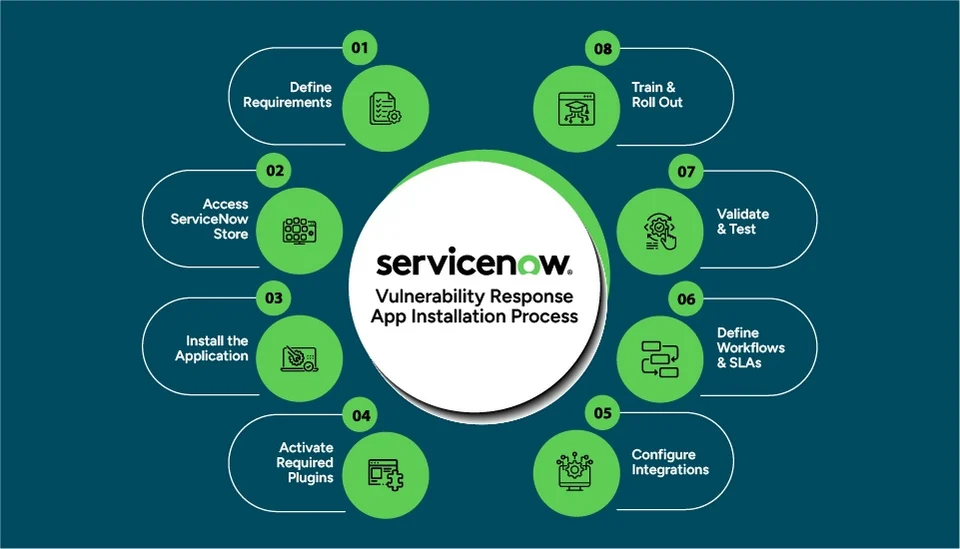
A successful VR implementation depends on more than installing the application. Organizations should plan for licensing and entitlements, supported integrations, CMDB data quality, remediation ownership, workflow design, and validation.
1. Define Requirements
Ensure you are running a supported ServiceNow release and have the Security Incident Response (SIR) or required plugins available.
2. Access ServiceNow Store
Confirm admin access and log into the ServiceNow Store with your admin credentials and select the vulnerability response application package.
3. Install the Application
Install the Vulnerability Response app into your ServiceNow instances, such as SecOps, GRC, and Integrated Risk Management (IRM). Installation typically takes a few minutes.
4. Activate Required Plugins
Once installed, activate related plugins like vulnerability integrations, such as Qualys, Tenable, Rapid7, etc., to enable scanner integrations.
5. Configure Integrations
Set up connections with your vulnerability scanners, CMDB, and threat intelligence sources. This ensures vulnerabilities flow into ServiceNow and are linked to your IT and security assets.
6. Define Workflows & SLAs
Configure automated workflows for remediation tasks, assign ownership to IT teams, and set SLAs for vulnerability closure based on severity.
7. Validate & Test
Run a test ingestion from your scanner, check data mapping with CIs, and validate that remediation tasks are being generated correctly.
8. Train & Roll Out
Provide short training sessions for security and IT teams. Roll out custom dashboards and reports for ongoing visibility into vulnerabilities and remediation progress.
Conclusion
ServiceNow Vulnerability Response helps organizations connect vulnerability findings with business context, remediation ownership, and IT workflows. Its value comes not simply from consolidating security data, but from helping teams prioritize work, coordinate fixes, track accountability, and maintain visibility into remediation progress. With the right integrations, data readiness, and workflow design, organizations can make vulnerability management more consistent and risk-focused.
V-Soft Consulting helps organizations assess, implement, integrate, and optimize ServiceNow SecOps capabilities to align vulnerability response workflows with their IT and security operations. Talk to our ServiceNow team to discuss your VR goals and implementation requirements.
Take control of your vulnerabilities before they take control of you.